AI Coding Assistants Compared: GitHub Copilot vs Codeium vs Replit AI
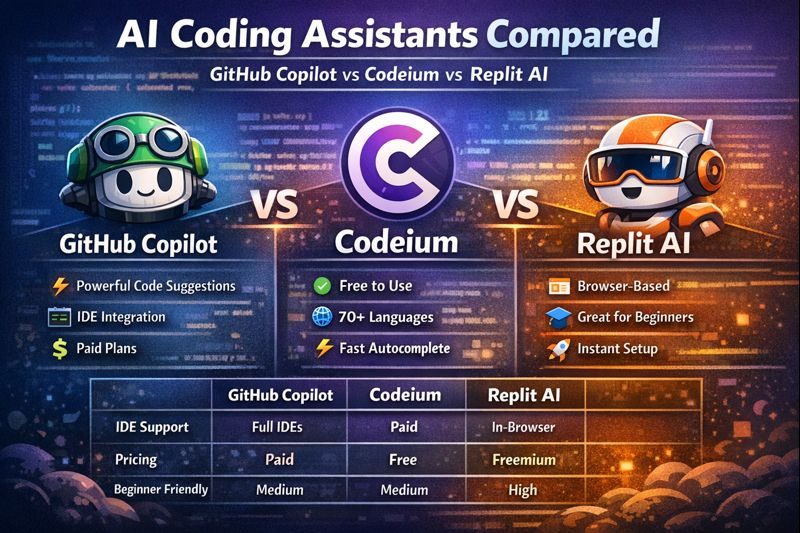
AI Coding Assistants Compared: GitHub Copilot vs Codeium vs Replit AI Artificial Intelligence has transformed the way developers write code. From autocomplete suggestions to full-function generation, AI coding assistants are becoming essential tools for beginners and professionals alike. In this blog, we’ll compare three of the most popular tools in 2026: GitHub Copilot, Codeium, and Replit AI. We’ll break down their features, pricing, strengths, weaknesses, and help you decide which AI coding assistant is best for your workflow. What Are AI Coding Assistants? AI coding assistants use large language models (LLMs) trained on billions of lines of code to help developers: Write code faster Reduce syntax errors Learn new programming languages Generate boilerplate and logic Debug and refactor code These tools integrate directly into IDEs or online editors and work in real time. GitHub Copilot Overview GitHub Copilot is one of the most widely adopted AI coding tools. Developed by GitHub and powered by OpenAI models, it acts like an AI pair programmer. Key Features Context-aware code suggestions Supports dozens of programming languages Deep integration with VS Code, JetBrains, Neovim Generates entire functions, classes, and tests Strong understanding of frameworks and APIs Pros Highly accurate code suggestions Excellent for professional developers Learns from your coding style Strong enterprise support Cons Paid subscription required Occasional overconfidence in suggestions Not ideal for absolute beginners Pricing Free for students and open-source maintainers Paid plans for individuals and businesses Codeium Overview Codeium is a fast-growing AI coding assistant positioned as a free alternative to GitHub Copilot. Key Features Free for individual developers Supports 70+ programming languages IDE integrations: VS Code, JetBrains, Vim, Emacs Chat-based code explanations AI-powered autocomplete and refactoring Pros Completely free for personal use Fast and lightweight Strong autocomplete performance Great for startups and indie developers Cons Slightly less accurate than Copilot for complex logic Smaller ecosystem Fewer enterprise features Pricing Free for individuals Paid enterprise plans available Replit AI Overview Replit AI is built into the Replit online development environment, making it ideal for beginners, students, and rapid prototyping. Key Features AI chat for code generation and explanations Runs entirely in the browser Instant environment setup Excellent for learning and experimentation Supports multiple languages and frameworks Pros Beginner-friendly No local setup required Perfect for quick demos and MVPs Integrated debugging and explanations Cons Less powerful for large-scale projects Limited IDE flexibility Best used within Replit ecosystem Pricing Free tier available Advanced AI features require subscription Feature Comparison Table Feature GitHub Copilot Codeium Replit AI IDE Support Excellent Excellent Browser-based Pricing Paid Free Freemium Beginner Friendly Medium Medium High Enterprise Ready Yes Yes Limited Learning Support Medium Medium High Offline Development Yes Yes No Which AI Coding Assistant Should You Choose? Choose GitHub Copilot if: You are a professional developer You work on complex, large-scale projects You want best-in-class code accuracy Choose Codeium if: You want a free AI coding assistant You are an indie developer or startup You need fast autocomplete without cost Choose Replit AI if: You are a beginner or student You prefer browser-based coding You want to learn by asking questions while coding Final Verdict All three AI coding assistants are excellent, but they serve different audiences: GitHub Copilot leads in power and accuracy Codeium wins on price and accessibility Replit AI excels in learning and ease of use The best AI coding assistant depends on your experience level, budget, and workflow
THE AI TOOL SPACE
1/24/20261 min read
My post content